
I Turned an ESP8266 Into a Second Sony TV Remote (NEC → Sony IR Translator + Wi-Fi Dashboard)
Lost your TV IR remote (in my case, a Sony remote)? Instead of hunting for a replacement, I built one — using a $2 generic IR remote, an ESP8266, and a bit of protocol translation.
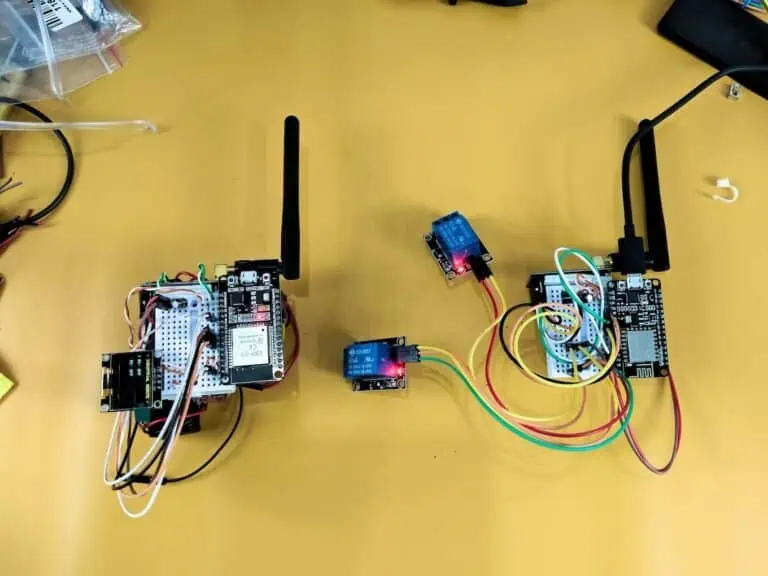
The idea is simple: the ESP8266 sits between a generic remote and the TV. It listens for button presses (NEC protocol), translates them into the TV’s actual Sony commands, and fires them at the TV over IR. As a bonus, it also runs a small Wi-Fi dashboard so you can control the TV from your phone too.
Note: The IR codes, button mapping, and wiring below are specific to my generic remote and my Sony TV. Your remote will almost certainly output different NEC codes, and depending on your TV model, the Sony codes may differ too. Don’t copy these values blindly — capture your own using the tool linked further down.
The Architecture
Two independent control paths, one shared output:
Generic Remote → IR Receiver → ESP8266 → IR Transmitter → TV   (always works)
Phone/PC → Wi-Fi → Web Dashboard → ESP8266 → IR Transmitter → TV   (needs Wi-Fi)
That “always works” part was non-negotiable. A remote that dies whenever the router reboots isn’t a remote — so the IR path runs completely independent of Wi-Fi state. No network, no dashboard, no problem: the physical remote keeps working.
Why Translation, Not Just “Program the Remote”
NEC and Sony SIRC are two completely different IR protocols — different bit lengths, different framing, different everything. A generic remote can only ever speak NEC; a Sony TV only understands SIRC. There’s no universal setting to fix this — something has to sit in the middle and translate one into the other. That’s the whole job of the ESP8266 here.
Capture Real Codes — Don’t Guess Them
Generic “Sony IR code” lists floating around online are unreliable — Sony reuses address/command spaces differently across TV lines, so a code that works on one model can silently fail on another. I captured every code directly from my own hardware using a small capture tool, in two flavors:
- Serial version — prints each captured code live to the Serial Monitor.
- Web dashboard version — logs every capture to a browser page, so you can capture a full remote’s worth of buttons in one session and pull the table out afterward. (This is the tool shown in the feature image above.)
Download the code:
- Main firmware — ESP8266_Sony_TV_Remote.ino
- IR Capture (Serial Monitor) — ESP8266_IR_Capture_Serial.ino
- IR Capture (Web Dashboard) — ESP8266_IR_Capture_WebDashboard.ino
Only the first one runs on the finished device — the other two are one-time tools to build your own code table.
My Captured Codes (For Reference Only)
Sony (from my TV’s remote):
| Function | HEX | Bits | Address | Command |
|---|---|---|---|---|
| Power | 0xA90 | 12 | 0x1 | 0x15 |
| Up | 0x2F0 | 12 | 0x1 | 0x74 |
| Down | 0xAF0 | 12 | 0x1 | 0x75 |
| Left | 0x2D0 | 12 | 0x1 | 0x34 |
| Right | 0xCD0 | 12 | 0x1 | 0x33 |
| Back | 0x62E9 | 15 | 0x97 | 0x23 |
| Options | 0x36E9 | 15 | 0x97 | 0x36 |
Notice Back/Options use a 15-bit frame with a different address than the rest — this is normal for Sony SIRC, and the firmware sends each command with its correct bit length rather than a fixed one.
Generic remote (mine):
| Button | HEX | Button | HEX |
|---|---|---|---|
* | 0xFF6897 | 4 | 0xFF22DD |
# | 0xFFB04F | 5 | 0xFF02FD |
OK | 0xFF38C7 | 6 | 0xFFC23D |
UP | 0xFF18E7 | 7 | 0xFFE01F |
DOWN | 0xFF4AB5 | 8 | 0xFFA857 |
LEFT | 0xFF10EF | 9 | 0xFF906F |
RIGHT | 0xFF5AA5 | 0 | 0xFF9867 |
Wiring
IR Receiver — straightforward, no level shifting needed:
| Receiver | ESP8266 |
|---|---|
| VCC | 3.3 V |
| GND | GND |
| DATA | D5 (GPIO14) |
IR Transmitter — this side needs a 3.3 V → 5 V logic-level converter:
| Low side (ESP8266) | → | Converter |
|---|---|---|
| D2 (GPIO4) | → | LV1 |
| 3.3 V | → | LV |
| GND | → | LV GND |
| High side | → | Converter |
|---|---|---|
| Real 5 V supply | → | HV |
| Common GND | → | HV GND |
| Transmitter DATA | ← | HV1 |
One important detail: a logic-level converter doesn’t create 5 V — it only shifts an existing signal’s logic level. The HV side needs its own real 5 V feed, or there’s nothing to step up to. This distinction turned out to matter a lot — more on that below.
The Range Problem (and the Real Fix)
Everything worked perfectly… within about 1–2 meters of the TV. Beyond that, commands started missing.
Before touching the code, I confirmed the logical path was fine: NEC codes were being received correctly, matching Sony codes were being generated correctly, and the transmitter’s indicator LED fired on every send. Since the logic checked out, this wasn’t a code problem — it was a signal strength problem.
Turns out 3.3 V simply wasn’t enough to drive the IR transmitter with sufficient range. The fix: a Logic-Level Shifter to convert the 3.3 V ESP8266 signal to a genuine 5 V on the HV side (not just tying it back to 3.3 V). Once the transmitter was actually driven at full 5 V amplitude, everything worked perfectly and the range increased noticeably.
Lesson: correct IR codes don’t guarantee range. If something works up close but flakes out at distance, check your transmitter’s drive voltage before you go back to debugging code.
Wi-Fi Layer (Optional, By Design)
- Reconnect: checked every ~5s automatically; also triggerable manually via a long-press on button 7. No repeated
WiFi.begin()spam. - Wi-Fi Manager: long-press button 8 spins up a configuration AP so you can set/change Wi-Fi credentials without reflashing. It doesn’t stay active after a reboot.
- Reset: long-press button 9 restarts the ESP8266 cleanly.
- Power loss: the device doesn’t care how long it was off — every boot does the same thing: init IR, load Wi-Fi config, try to connect, start the dashboard if connected.
IR always works first; Wi-Fi is layered on top, never a dependency.
Final Button Map
| Button | Function | Button | Function |
|---|---|---|---|
* | Power | 4 | Volume Down |
# | HDMI | 5 | Play/Pause |
OK | OK | 6 | Volume Up |
UP/DOWN/LEFT/RIGHT | Sony Nav | 7 (long) | Wi-Fi Reconnect |
0 | Mute | 8 (long) | Wi-Fi Manager |
1 | Home | 9 (long) | Reset |
2 | Back | ||
3 | Options |
Quick Troubleshooting Notes
WiFiStatecompile error — that name is already used by the ESP8266 Wi-Fi library. Rename your custom type.- Held buttons behave weirdly — NEC remotes send a repeat frame (
0xFFFFFFFFFFFFFFFF, 0 bits) instead of resending the full code. Handle it explicitly, or long-press functions won’t register properly. - Works close, fails far — see the range section above. It’s almost always the drive voltage, not the protocol.
What This Project Really Teaches
- NEC ≠ Sony SIRC — always translate, never assume compatibility.
- Capture real codes from real hardware; don’t trust generic code lists.
- Logic-level conversion ≠ voltage generation — the HV side needs its own supply.
- A physical remote shouldn’t have Wi-Fi as a single point of failure.
- “It works close up” doesn’t mean the signal path is solid.
Try It Yourself
Grab the three sketches above, capture your own remote’s codes with the capture tool, and build your translation table. Every remote and every TV will give you different hex values — that’s expected. The architecture is what’s reusable, not the numbers.